# dedecms软件模型手动指定地址增加选取本地文件方法

*Published:* 2023-10-26
*Author:* 客服001

#### 温馨提醒

如果文章内容或图片资源失效，请留言反馈，我们会及时处理，谢谢

本文最后更新于2023年10月26日，已超过 180天没有更新


[![](https://www.xarjtc.com/wp-content/uploads/2023/10/1-2205111I101135.png)](https://www.xarjtc.com/wp-content/uploads/2023/10/1-2205111I101135.png)

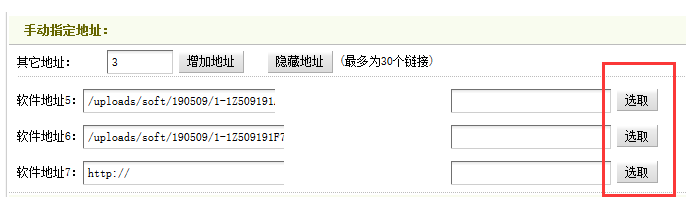
**实现教程：**

1、打开 /dede/templets/soft\_add.htm 找到

```
<input type='text' name='servermsg"+startNum+"' style='width:150px' />
```

在它后面加入

```
<input name=\"sel1\" id=\"sel1\" value=\"选取\" onclick=\"SelectSoft('form1.softurl"+startNum+"')\" type=\"button\">
```

2、打开 /dede/templets/soft\_edit.htm 找到

```
<input type='text' name='servermsg"+startNum+"' style='width:150px' />
```

在它后面加入

```
<input name=\"sel1\" id=\"sel1\" value=\"选取\" onclick=\"SelectSoft('form1.softurl"+startNum+"')\" type=\"button\">
```

3、打开 /dede/soft\_edit.php 找到

```
else $needmsg = '<input name="sel1" type="button" id="sel1" value="选取" onClick="SelectSoft(\'form1.softurl'.$newRowStart.'\')" />';
```

删除这一行或者注释掉这一行

继续找到

```
<input type='hidden' name='islocal{$newRowStart}' value='{$islocal}' />
```

在它后面加入

```
<input name=\"sel1\" id=\"sel1\" value=\"选取\" onclick=\"SelectSoft('form1.softurl{$newRowStart}')\" type=\"button\">
```

修改到这里就是完成了，需要这个功能的朋友可以去试下。